
End-to-end UX design - mobile app and responsive website for a contemporary public art museum.
ROLE
Lead UX Designer and Researcher
TOOLS
Figma · FigJam · Paper
DURATION
January - March 2026
PLATFORMS
Mobile app + responsive website
The problem
Why does planning a gallery visit feel so hard?
Many potential visitors struggle to find clear information about exhibitions and book visits easily online. Scattered information and complex booking processes make planning feel overwhelming, particularly for busy professionals and first-time visitors.
The goal
Streamlined experience
Design a mobile app and responsive website that allows users to easily discover exhibitions, access clear event information and book gallery visits quickly and confidently, reducing cognitive load at every step.
Understanding the user
Research and personas
I began with the assumption that users mainly struggle with booking tickets. Research revealed a deeper problem, users feel overwhelmed by scattered information and unclear event availability. This shifted my focus toward designing a centralised experience that reduces cognitive overload and makes booking feel simple and reassuring.
PAIN POINT 1
Scattered information
Details spread across multiple pages causes confusion and overwhelm.
PAIN POINT 2
Difficulty planning ahead
Unclear availability frustrates users who want to plan in advance.
"I love cultural experiences but I want planning them to feel simple and enjoyable, not stressful."
— Sarah Williams, persona
PAIN POINT 3
Content overload
Too much information at once causes users to disengage entirely.
PAIN POINT 4
Lack of reassurance
Users want confirmation they made the right choices when booking.
SW
Sarah Williams
Marketing Manager, 35 — Manchester
Busy professional who loves cultural experiences but wants planning to feel simple. Frustrated by information spread across multiple pages and unclear booking processes.
Plan in advance
Confident booking
Clear information
JP
Jaymin Patel
First-time museum visitor who feels uncertain about what to expect. Overwhelmed by too much information and confused by ticket options. Wants digital experiences that guide him clearly.
Postgraduate Student, 26 — Leicester
Reassurance
Simple guidance
Low effort
Storyboards
Understanding Sarah's story
Before touching Figma, I drew two storyboards by hand to understand Sarah's emotional journey, one showing her context and feelings, one showing her interactions with the app screens. This grounded every design decision in a real human experience.

Big picture storyboard
Sarah's emotional journey from stressed to organised - six scenes showing her context, frustration and resolution.

Close-up storyboard
Sarah's interactions with each app screen - from opening the app to receiving her booking confirmation.
Paper wireframes
Exploring ideas quickly on paper
I sketched four versions of the home screen - labelled A, B, C and D - exploring different hierarchies and placements of key elements. Stars marked the strongest elements from each version, which I combined into a refined wireframe.

This rapid iteration process let me focus on structure and functionality before committing to any visual decisions in Figma.

Digital wireframes
Translating paper into Figma
Following the initial paper sketches, I developed digital wireframes in Figma to define the information architecture and interactions more clearly. This stage allowed for testing the user flow and ensuring that the structural hierarchy met the needs identified during research.
Exhibitions and Events screen

Addresses the scattered information pain point. Clear category tabs and availability toggle help users scan options without feeling overwhelmed.
Focusing on filter accessibility and clear results.
Booking selection screen
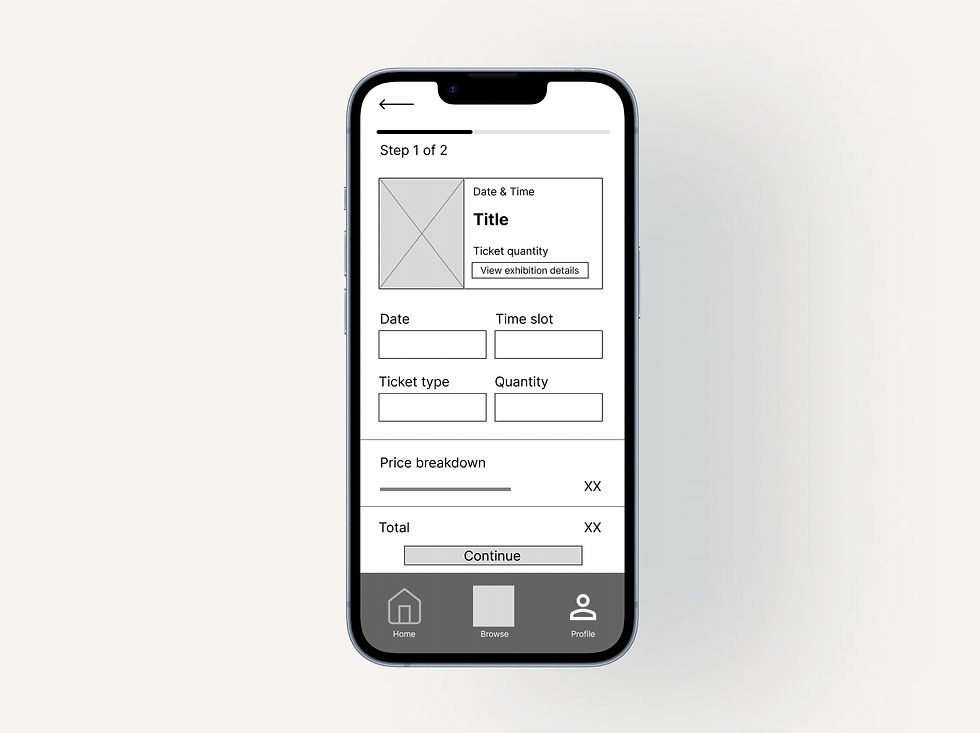
Simplifying the ticket selection and checkout screens.
Reducing steps to prevent user drop-off.
Responsive design
Adapting the experience across devices
Desktop Home

Mobile Home

Usability testing
What I learned from testing
App study findings
1
Users expect elements to behave as they appear
Interactive elements need clear affordances to build trust.
Website study findings
1
Overall layout was visually clear and appealing
Participants responded positively to the visual design.
2
3
Clear confirmation screens increase booking confidence
Users felt reassured when confirmations were specific and detailed.
Users want to review details before and after booking
A persistent My Bookings screen was needed to address post-booking anxiety.
2
Hamburger menu caused navigation confusion
All nav options incorrectly led to the home screen.
3
Book Tickets CTA did not respond
Users lost trust when the primary action button had no response.
Design iterations — before and after
App — added My Bookings screen
BEFORE

AFTER

→
Adding a persistent My Bookings screen increased user trust and post-booking reassurance.
Website — fixed navigation accuracy
BEFORE

AFTER

→
Each nav element linked to its correct destination, creating a predictable experience.
Accessibility
Designing for everyone
01
Typographic hierarchy
Clear size, weight and spacing hierarchy supports readability for users with low vision or reading difficulties.
02
Colour not used alone
Icons, labels and descriptive text accompany colour throughout, supporting users with colour vision deficiencies.
03
Large touch targets
Buttons and interactive elements have generous touch areas and clear labels, supporting users with motor impairments.
Usability testing
What I learned
Participants described the app as professional, clear and easy to navigate. One noted they would definitely use it in real life, the strongest validation a UX designer can receive at this stage.
This project taught me the importance of testing designs early and iterating based on real user feedback. Usability studies revealed small issues invisible during the design phase, reinforcing that user research and iterative design are essential for creating intuitive experiences.
Next steps
1
Wider usability testing
Test with a larger, more diverse group including users with specific accessibility needs.
2
Refine the booking flow
Further simplify interactions and improve efficiency throughout the booking process.
3
Personalised features
Add personalised recommendations and saved exhibitions to enhance engagement.